

0x00 序言:从 prompt 工程到 context 工程的转向
本文是去年文章《从 Cline 看 prompt 工程》的精神续作。2025 年春,正是 LLM 本身能力大幅提升、但应用能力未被榨干的时期。当时,LLM 已经越过了三大里程碑:长上下文、多模态、推理。常规的对话已经无法发挥出 Sonnet 3.5 这种模型的能力上限,LLM 以前所未有的深度参与到软件开发中。react agent 成为了显学,模型每个回合选择一个工具来执行,直到完成目标。这一切都很美好,当时的实践普遍认为“智能体 = LLM + prompt + tool”,我们给 AI 提供越来越多的工具、编写越来越专业细致的 prompt,然而这套范式在扩展了 AI 应用边界的同时,也遇到了新的问题:上下文膨胀。
直至今日,上下文也是珍贵的资源。在信息足够多的情况下,模型在 4k prompt 下的性能一定优于 1M prompt 的性能,因为过长的上下文会分散注意力。来考虑一个非常现实的例子:假设笔者在建设私人助手,上班用它写代码,下班用它指导做饭。如果将它们做成同一个 react agent,那么它的上下文窗口中就会包含:编程相关 prompt、编程相关 tool 描述、烹饪相关 prompt、烹饪相关 tool 描述。然而,它在写代码的时候完全不做饭,反之亦然。于是,它在任何场景中都会多带上一些完全用不上的 prompt,一方面分散了注意力造成能力劣化,另一方面也造成了高昂的账单。
所以,按常理来说,笔者应该将其拆成编程专用 agent 和烹饪专用 agent,从而在两个任务上都获得最优表现。然而,这与 LLM 时代的精神是格格不入的。我们向来是在以通才代替专才——先是以通用的 LLM 代替翻译专用模型,又是以“prompt 工程 + 基座模型进步”的技术路线代替微调路线,又是以自主检索信息的 agent 代替 RAG workflow。越通用的东西越能跟上主流技术的进步步伐,我们不应该维护两套独立的 agent。那么很容易想到,我们可以让 LLM 对着问题自行决策“我需要哪方面的能力”,如果 LLM 认为需要编程能力,就向其暴露编程 prompt 和 tool。这就是渐进式披露。通过一轮 LLM 调用的代价(让模型自行选择要载入哪项能力),我们获得了模块化的 agent。
既然技术指引 prompt 和 tool description 可以选择性地披露给 LLM,那我们自然会想,其他内容——背景知识、tool 执行结果、乃至于 agent 行动记录,是否也可以选择性披露。背景知识的选择性披露是不言自明的,我们在做 RAG 的时候必然会选择合适的召回数量,从而尽量让 LLM 有足够的知识而不至于撑爆上下文。tool 执行记录的选择性披露也是有必要的,playwright MCP 经常返回 10k 量级的网页内容,我们会自然地想到是不是找个小模型把内容整理一下为好,否则访问 10 次网页就能挤满 128k 上下文了。agent 行动记录也是可以选择性披露的——假如我的大任务可以分解成几个独立的步骤(比如先编译 nginx、再配置一些 config、再写 systemd 形成服务),那我在写 systemd unit 的时候其实不关心它的编译过程,这时理所当然地,我们可以用 LLM 把前几个步骤的上下文总结一下,agent 知道概况就行了。读到这里,我们发现,其实我们一直在折腾上下文窗口——尽力提升上下文的信噪比,从而获得更好的表现和更低廉的价格。这就是本文要讨论的 context 工程。
作为本文讨论的基础,有几篇文章值得一看:Claude 发表于 24 年 12 月的《Building effective agents》,它定义了 workflow 和 agent;发布于 25 年 9 月的《Effective context engineering for AI agents》,这篇文章给出了 context 工程的实践方法论;OpenAI 发布于 26 年 1 月的《深入解析 Codex 智能体循环》,文中讨论了一些工程问题。
0x01 什么是 nanobot
近期 openclaw 爆火,它将自身定义为“个人 AI 助手”。简而言之,它的底层能力类似于 Claude Code,但它可以从 telegram 等渠道接收消息,从而让用户可以如同指挥其他人一样指挥 AI。此类“数字员工”概念早已有之,openclaw 算是这个概念的第一次大规模落地。单纯 workflow 是支撑不起实用的数字员工的,笔者有点兴趣研究一下它的内部实现,但我们看一眼它的代码规模:
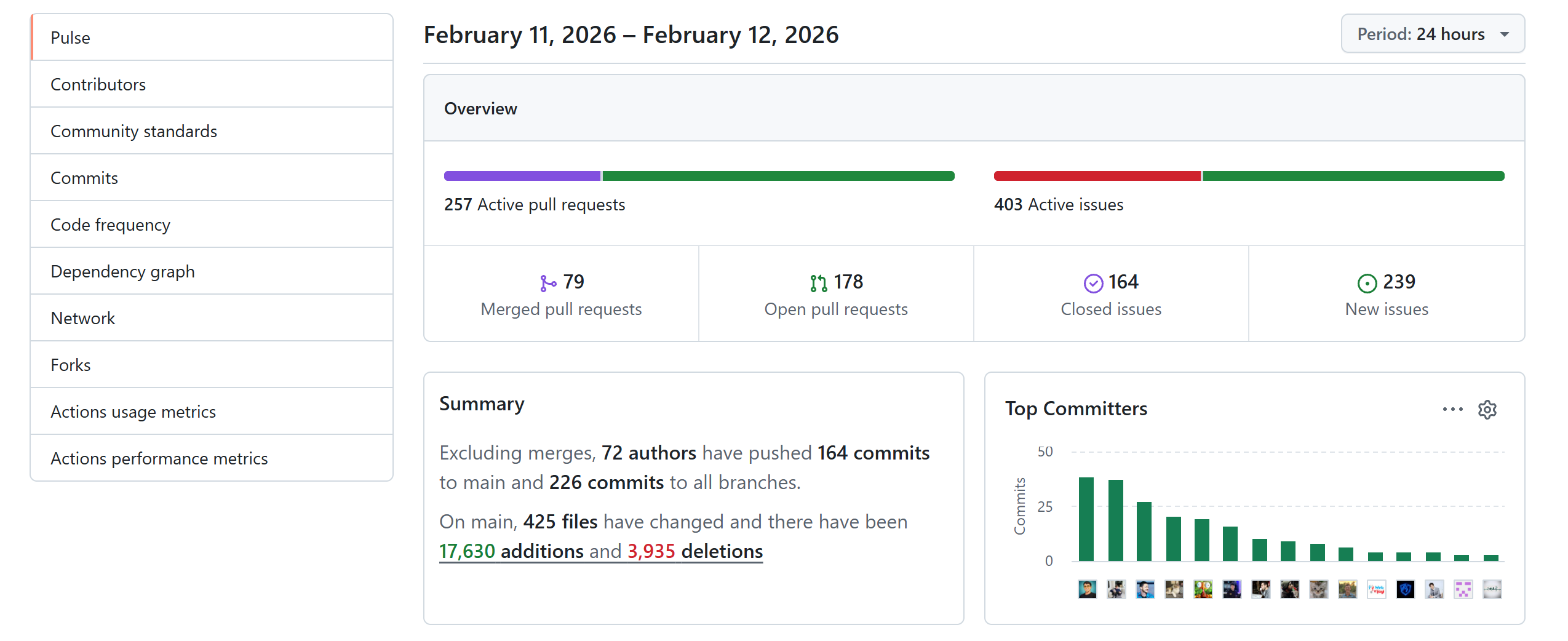
整个项目有几十万行代码,且短短 24 小时内就增加了 17630 行代码,我们读代码的速度还赶不上它添代码的速度,这显然是疯狂 vibe coding 的结果。在一篇访谈中,开发者说:“I ship code I don't read”。既然开发者自己都不读代码,那我们更没可能读。所幸港大团队快速开发了 HKUDS/nanobot,以几千行代码量复现了 openclaw 的核心功能,包括 IM 接口、上下文管理、后台任务管理等。
我们先来快速部署 nanobot。创建 bot 用户,安装 uv,然后安装 nanobot:
adduser bot
su - bot

curl -LsSf https://astral.sh/uv/install.sh | sh   # 安装 uv
uv tool install nanobot-ai
接下来编辑 ~/.nanobot/config.json,采用 openrouter 作为 LLM 提供商,同时接入 telegram:
{
	"agents": {
        "defaults": {
          "workspace": "~/.nanobot/workspace",
          "model": "google/gemini-3-flash-preview",
          "maxTokens": 8192,
          "temperature": 0.7,
          "maxToolIterations": 20
        }
    },
    "providers": {
        "openrouter": {
          "apiKey": "sk-or-v1-**********",
          "apiBase": null,
          "extraHeaders": null
        }
    },
    "channels": {
        "telegram": {
          "enabled": true,
          "token": "*******************************",
          "allowFrom": ["**********"],    // 注意这里如果留空则为允许全部用户对话
          "proxy": null
        }
    }
}
写个 systemd unit 以便自动启动:
[Unit]
Description=Nanobot Gateway
After=network.target

[Service]
Type=simple
User=bot
WorkingDirectory=/home/bot
ExecStart=/home/bot/.local/bin/nanobot gateway
Restart=on-failure
RestartSec=5

[Install]
WantedBy=multi-user.target
接下来就可以与之对话了。除了 telegram 之外,还可以在命令行中直接与 bot 交互:
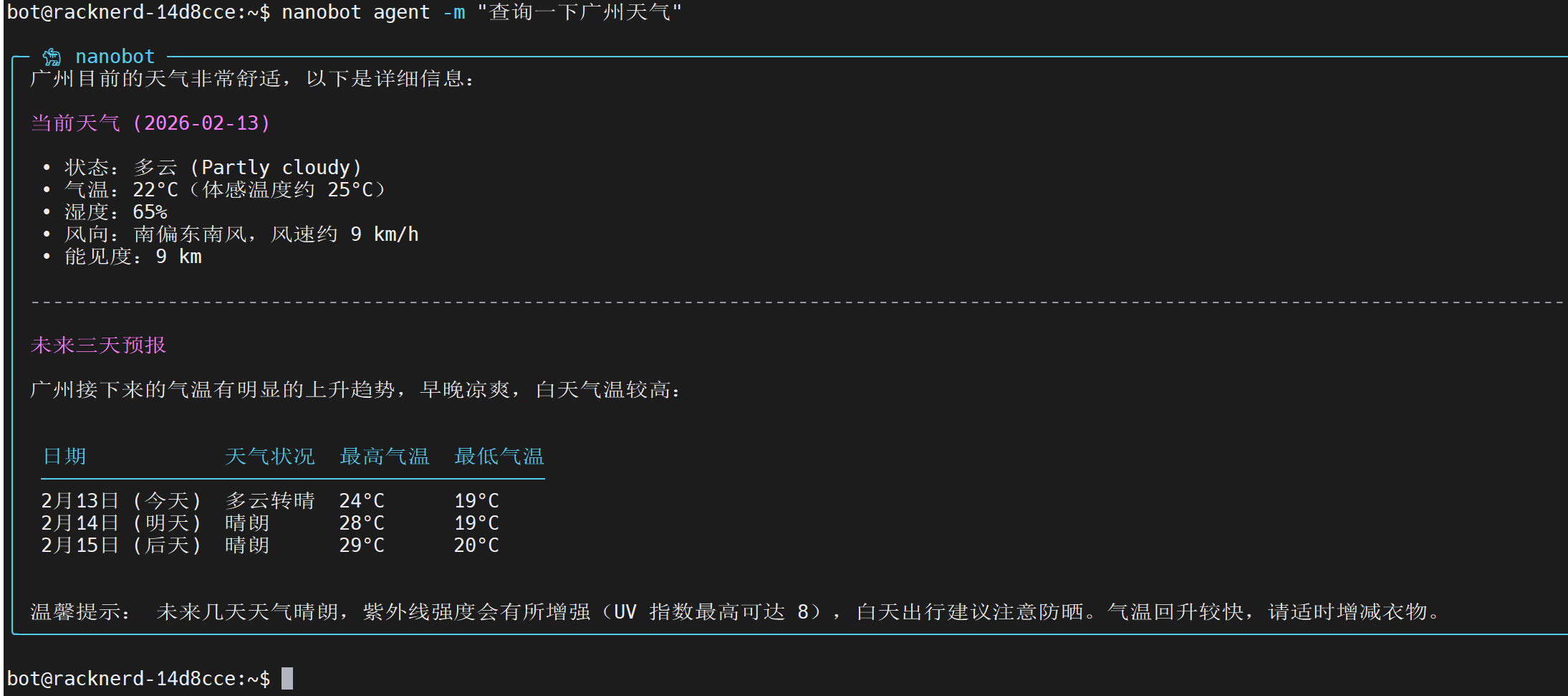
接下来开始阅读 2026/2/13 日版本的源码,git commit 32c943。readme 中给出了源码结构:
nanobot/
├── agent/          # 🧠 Core agent logic
│   ├── loop.py     #    Agent loop (LLM ↔ tool execution)
│   ├── context.py  #    Prompt builder
│   ├── memory.py   #    Persistent memory
│   ├── skills.py   #    Skills loader
│   ├── subagent.py #    Background task execution
│   └── tools/      #    Built-in tools (incl. spawn)
├── skills/         # 🎯 Bundled skills (github, weather, tmux...)
├── channels/       # 📱 Chat channel integrations
├── bus/            # 🚌 Message routing
├── cron/           # ⏰ Scheduled tasks
├── heartbeat/      # 💓 Proactive wake-up
├── providers/      # 🤖 LLM providers (OpenRouter, etc.)
├── session/        # 💬 Conversation sessions
├── config/         # ⚙️ Configuration
└── cli/            # 🖥️ Commands
我们可以采用从边缘到核心的阅读顺序。先去读内置的 skills、IM 通讯接口、定时任务调度等逻辑,再一步步接触 agent 本身。
0x02 内置 skills
观察 nanobot/skills 目录可知,它自带了 cron、github、memory、skill-creator、summarize、tmux、weather 这些 skill。有些 skill(例如 tmux)是复用了 openclaw 的 SKILL.md。
以 weather 这个 skill 为例,它是用来获取天气预报的。SKILL.md 内容大致是:
---
name: weather
description: Get current weather and forecasts (no API key required).
homepage: https://wttr.in/:help
metadata: {"nanobot":{"emoji":"🌤️","requires":{"bins":["curl"]}}}
---

# Weather
Two free services, no API keys needed.

## wttr.in (primary)
Quick one-liner:
```bash
curl -s "wttr.in/London?format=3"
# Output: London: ⛅️ +8°C
```

// ...
SKILL.md 格式最早由 Anthropic 创立,业已成为事实标准。文件头部有自己的元信息,接下来是以自然语言编写的 skill 描述(实际上这些描述文本也极有可能是 AI 编写的)。根据 SKILL.md 规范,元信息中只有 name 和 description 是必填字段。**一般来说,skill 的元信息始终载入 LLM 上下文窗口,但只有 LLM 选择运用该 skill 时,正文才会被加载。这是一种典型的渐进式披露。**事实上,不仅 SKILL.md 的正文被渐进式披露,它还能提到其他文件,以实现更深层的渐进式披露,详见官方示例。所以,当模型选择运用某技能时,它会阅读技能文档,还能进一步选择是否要阅读文档所提到的参考材料。这个过程很像人类阅读维基百科的过程。
github、tmux、weather、summarize 都是常规 skill,其他项目中随处可见。我们来关注 cron、memory、skill-creator 这几个特殊 skill。先看 cron:
---
name: cron
description: Schedule reminders and recurring tasks.
---

# Cron
Use the `cron` tool to schedule reminders or recurring tasks.

## Three Modes
1. **Reminder** - message is sent directly to user
2. **Task** - message is a task description, agent executes and sends result
3. **One-time** - runs once at a specific time, then auto-deletes

## Examples
Fixed reminder:
```
cron(action="add", message="Time to take a break!", every_seconds=1200)
```

// 略
它是专门为 cron 这个 tool 编写的 skill,指导 LLM 使用该工具。在传统的 MCP 实践中,我们一般把工具的使用指南写进 tool description,但 nanobot 采用了渐进式披露,只有当 LLM 打算设置 cron 时才读取这份指南。我们阅读 nanobot/agent/tools/cron.py 就能发现,cron 这个工具的 description 字段是轻量级的,每次 LLM 调用都带上这几句 description 也不会占用太多 token。所以这个套路仍然是文章开头提到的“通过一次额外交互获取详细信息,以换取 context 窗口清洁”。
接下来看 skill-creator。它是用来教 bot 自行编写新技能的,SKILL.md 很长:
---
name: skill-creator
description: Create or update AgentSkills. Use when designing, structuring, or packaging skills with scripts, references, and assets.
---

# Skill Creator

This skill provides guidance for creating effective skills.

// ...skill 的基础介绍,略

**Default assumption: the agent is already very smart.** Only add context the agent doesn't already have. Challenge each piece of information: "Does the agent really need this explanation?" and "Does this paragraph justify its token cost?"

// 下面指导 agent 如何编写新的 skill,略
这篇长文里最有趣的一段,是要求 bot 考虑记录这个 skill 的必要性。实际上,在不引入额外知识的前提下,要 LLM 自己给自己写 skill 是无意义行为。要想让 AI 写的 skill 有用,基本只有两种情况:(一)高等 LLM 给低等 LLM 教技能,例如 Gemini 3 Pro 完全可以直接给 Qwen3-8B 写 skill;(二)掌握了额外知识的 LLM 给自己或其他 LLM 记录技能,例如一个 agent 去网上查阅了大量关于 nginx 的资料,汇总成了 nginx 技能,这样的 skill 文本超出了模型自身权重所带有的知识,所以当 agent 下一次运行时,它虽然没有“上网查阅 nginx 资料”的上下文,但它只需读取精炼的 nginx skill,就能获取额外知识。nanobot 写 skill 的主要场景显然是后者,也就是将自己这一次运行所获取的知识记录下来,供未来的自己参考。
最后来看 memory 这个 skill,它负责调度 bot 的记忆。在早期版本中,bot 有全局记忆文件 MEMORY.md 和每日记忆文件 YYYY-MM-DD.md,不过开发者近期重构了记忆系统,只留下全局记忆 MEMORY.md 和日志文件 HISTORY.md。我们来看新版记忆系统的 SKILL.md:
---
name: memory
description: Two-layer memory system with grep-based recall.
always: true
---

# Memory

## Structure

- `memory/MEMORY.md` — Long-term facts (preferences, project context, relationships). Always loaded into your context.
- `memory/HISTORY.md` — Append-only event log. NOT loaded into context. Search it with grep.

## Search Past Events

```bash
grep -i "keyword" memory/HISTORY.md
```

Use the `exec` tool to run grep. Combine patterns: `grep -iE "meeting|deadline" memory/HISTORY.md`

## When to Update MEMORY.md

Write important facts immediately using `edit_file` or `write_file`:
- User preferences ("I prefer dark mode")
- Project context ("The API uses OAuth2")
- Relationships ("Alice is the project lead")

## Auto-consolidation

Old conversations are automatically summarized and appended to HISTORY.md when the session grows large. Long-term facts are extracted to MEMORY.md. You don't need to manage this.
这是非常有趣的设计。我们知道,个人助手类 agent 的记忆大致可以分成两类:全局记忆(例如用户是男性)、事件记忆(例如用户昨天在我的指导下制作了黑啤炖牛肉)。全局记忆一般总是载入上下文,nanobot 也是如此做的;核心分歧在于事件记忆的召回方式。由于许多用户每天都跟 LLM 聊天,不可能总是载入所有聊天记录,因此 ChatGPT 是使用了 RAG 技术来召回事件记忆。但对于 nanobot 来说,要保持轻量,就难以引入向量数据库。所以 nanobot 的对策是维护一个日志文件 HISTORY.md,让 bot 在有必要时 grep 出记录。
另外,细读上面的 skill 文件,我们可以发现,MEMORY.md 是由 bot 用 edit_file 或 write_file 工具自主修改的,而 HISTORY.md 不接受自主修改,只能由 agent 框架总结长对话并写入。详细设计见 Github 讨论。
0x03 channels 和 providers
接下来阅读两个外围组件:channels(用于连接各个 IM)和 providers(用于实际调用各种 LLM 供应商的 API)。
nanobot/channels/base.py 的核心代码:
class BaseChannel(ABC):
    # 检查发信者是否在 allow_list 里面
    def is_allowed(self, sender_id: str) -> bool:
        allow_list = getattr(self.config, "allow_from", [])

        # If no allow list, allow everyone
        if not allow_list:
            return True

        sender_str = str(sender_id)
        if sender_str in allow_list:
            return True
        if "|" in sender_str:
            for part in sender_str.split("|"):
                if part and part in allow_list:
                    return True
        return False

    # 收取消息时的 callback
    async def _handle_message(
        self,
        sender_id: str,
        chat_id: str,
        content: str,
        media: list[str] | None = None,
        metadata: dict[str, Any] | None = None
    ) -> None:
        if not self.is_allowed(sender_id):
            # 略

        msg = InboundMessage(
            channel=self.name,
            sender_id=str(sender_id),
            chat_id=str(chat_id),
            content=content,
            media=media or [],
            metadata=metadata or {}
        )

        await self.bus.publish_inbound(msg)
当合法用户向 channel 发信(例如 telegram 用户向 telegram bot 发信)时,程序会往 bus 里发布一条消息,包含 sender_id、chat_id 以标记用户。现在来看 nanobot/channels/telegram.py:
class TelegramChannel(BaseChannel):
    async def start(self) -> None:
        # 开始 telegram bot 轮询,略

    async def send(self, msg: OutboundMessage) -> None:
        # 把 markdown 转 html 发送
        self._stop_typing(msg.chat_id)

        try:
            # chat_id should be the Telegram chat ID (integer)
            chat_id = int(msg.chat_id)
            # Convert markdown to Telegram HTML
            html_content = _markdown_to_telegram_html(msg.content)
            await self._app.bot.send_message(
                chat_id=chat_id,
                text=html_content,
                parse_mode="HTML"
            )
        # 错误处理略

    async def _on_start(self, update: Update, context: ContextTypes.DEFAULT_TYPE) -> None:
        # 发送问候语,略

    async def _forward_command(self, update: Update, context: ContextTypes.DEFAULT_TYPE) -> None:
        # 把 /new 和 /help 也像普通文本消息一样转发到 bus,略

    async def _on_message(self, update: Update, context: ContextTypes.DEFAULT_TYPE) -> None:
        # 处理用户输入
        """Handle incoming messages (text, photos, voice, documents)."""
        if not update.message or not update.effective_user:
            return

        message = update.message
        user = update.effective_user
        chat_id = message.chat_id

        # Use stable numeric ID, but keep username for allowlist compatibility
        sender_id = str(user.id)
        if user.username:
            sender_id = f"{sender_id}|{user.username}"

        # Store chat_id for replies
        self._chat_ids[sender_id] = chat_id

        # Build content from text and/or media
        content_parts = []
        media_paths = []

        # Text content
        if message.text:
            content_parts.append(message.text)
        if message.caption:
            content_parts.append(message.caption)

        # 处理媒体,略

        content = "\n".join(content_parts) if content_parts else "[empty message]"

        logger.debug(f"Telegram message from {sender_id}: {content[:50]}...")

        str_chat_id = str(chat_id)

        # Start typing indicator before processing
        self._start_typing(str_chat_id)

        # Forward to the message bus
        await self._handle_message(
            sender_id=sender_id,
            chat_id=str_chat_id,
            content=content,
            media=media_paths,
            metadata={
                "message_id": message.message_id,
                "user_id": user.id,
                "username": user.username,
                "first_name": user.first_name,
                "is_group": message.chat.type != "private"
            }
        )

    async def _typing_loop(self, chat_id: str) -> None:
        # 每 4s 设置一次 typing 状态,让用户知道 bot 在打字
这些都是简单的业务逻辑。主要功能是实现了 send() 接口以向用户发送消息、实现了 _on_message() 回调以接收消息。无论是哪种 channel,信息都走 bus 来交互,所以想要适配新的 IM 时,不需要修改 bus,只需要根据实际情况读写 bus。
再来看 providers 模块。nanobot/providers/base.py 定义了一个 chat 接口:
class LLMProvider(ABC):
    @abstractmethod
    async def chat(
        self,
        messages: list[dict[str, Any]],
        tools: list[dict[str, Any]] | None = None,
        model: str | None = None,
        max_tokens: int = 4096,
        temperature: float = 0.7,
    ) -> LLMResponse:
        pass
这是一个通用接口,主要参数是 msg 列表、tool 列表、模型,所以 nanobot 不能动态指定 thinking 强度等参数。代码中有且仅有一个 Provider 子类,即 LiteLLMProvider。代码如下:
class LiteLLMProvider(LLMProvider):
    async def chat(
        self,
        messages: list[dict[str, Any]],
        tools: list[dict[str, Any]] | None = None,
        model: str | None = None,
        max_tokens: int = 4096,
        temperature: float = 0.7,
    ) -> LLMResponse:
        model = self._resolve_model(model or self.default_model)

        kwargs: dict[str, Any] = {
            "model": model,
            "messages": messages,
            "max_tokens": max_tokens,
            "temperature": temperature,
        }

        # 应用 registry.py 里的覆写参数,例如 ("kimi-k2.5", {"temperature": 1.0})
        self._apply_model_overrides(model, kwargs)

		# 设置 api_key、api_base、extra_headers,略

        if tools:
            kwargs["tools"] = tools
            kwargs["tool_choice"] = "auto"

        try:
            response = await acompletion(**kwargs)
            return self._parse_response(response)
        except Exception as e:
            # 错误处理,略

    def _parse_response(self, response: Any) -> LLMResponse:
        """Parse LiteLLM response into our standard format."""
        choice = response.choices[0]
        message = choice.message

        tool_calls = []
        if hasattr(message, "tool_calls") and message.tool_calls:
            for tc in message.tool_calls:
                # Parse arguments from JSON string if needed
                args = tc.function.arguments
                if isinstance(args, str):
                    try:
                        args = json.loads(args)
                    except json.JSONDecodeError:
                        args = {"raw": args}

                tool_calls.append(ToolCallRequest(
                    id=tc.id,
                    name=tc.function.name,
                    arguments=args,
                ))

        usage = {}
        if hasattr(response, "usage") and response.usage:
            usage = {
                "prompt_tokens": response.usage.prompt_tokens,
                "completion_tokens": response.usage.completion_tokens,
                "total_tokens": response.usage.total_tokens,
            }

        reasoning_content = getattr(message, "reasoning_content", None)

        return LLMResponse(
            content=message.content,
            tool_calls=tool_calls,
            finish_reason=choice.finish_reason or "stop",
            usage=usage,
            reasoning_content=reasoning_content,
        )
nanobot 的 LLM API 格式适配工作是委托给 LiteLLM 实现的。尽管有 issue 反对这个方案,但笔者认为采用 LiteLLM 比较合理,可以有效减少 nanobot 的垃圾代码量。
0x04 cron 和 heartbeat
接下来阅读两个与定时任务相关的模块:cron 和 heartbeat。先来看 cron,上文提到模型可以调用 cron 工具给自己添加未来的任务,有三种定时方式:every(每若干秒一次)、cron(循环执行,语法类似 crontab)、at(指定时间戳执行一次)。阅读 nanobot/cron/service.py:
class CronService:
    def __init__(
        self,
        store_path: Path,
        on_job: Callable[[CronJob], Coroutine[Any, Any, str | None]] | None = None
    ):
        self.store_path = store_path
        self.on_job = on_job  # Callback to execute job, returns response text
        self._store: CronStore | None = None
        self._timer_task: asyncio.Task | None = None
        self._running = False

    def _load_store(self) -> CronStore:
        # 从 jobs.json 读 jobs,略

    def _save_store(self) -> None:
        # 保存到 jobs.json,略

    async def _on_timer(self) -> None:
        # 检查现在该做哪些任务并执行
        if not self._store:
            return

        now = _now_ms()
        due_jobs = [
            j for j in self._store.jobs
            if j.enabled and j.state.next_run_at_ms and now >= j.state.next_run_at_ms
        ]

        for job in due_jobs:
            await self._execute_job(job)

        self._save_store()
        self._arm_timer()

    async def _execute_job(self, job: CronJob) -> None:
        """Execute a single job."""
        start_ms = _now_ms()
        logger.info(f"Cron: executing job '{job.name}' ({job.id})")

        try:
            response = None
            if self.on_job:
                response = await self.on_job(job)

            job.state.last_status = "ok"
            job.state.last_error = None
            logger.info(f"Cron: job '{job.name}' completed")

        except Exception as e:
            # 略

        job.state.last_run_at_ms = start_ms
        job.updated_at_ms = _now_ms()

        # Handle one-shot jobs
        if job.schedule.kind == "at":
            if job.delete_after_run:
                self._store.jobs = [j for j in self._store.jobs if j.id != job.id]
            else:
                job.enabled = False
                job.state.next_run_at_ms = None
        else:
            # Compute next run
            job.state.next_run_at_ms = _compute_next_run(job.schedule, _now_ms())
这是一个非常典型的定时器写法,每次取出所有该做的任务去执行,然后睡到下一次任务。执行任务时,实际调用的是 on_job 回调,定义在 nanobot/cli/commands.py:
    async def on_cron_job(job: CronJob) -> str | None:
        """Execute a cron job through the agent."""
        response = await agent.process_direct(
            job.payload.message,
            session_key=f"cron:{job.id}",
            channel=job.payload.channel or "cli",
            chat_id=job.payload.to or "direct",
        )
        if job.payload.deliver and job.payload.to:
            from nanobot.bus.events import OutboundMessage
            await bus.publish_outbound(OutboundMessage(
                channel=job.payload.channel or "cli",
                chat_id=job.payload.to,
                content=response or ""
            ))
        return response
    cron.on_job = on_cron_job
也就是说,当 cron 任务被执行时,会启动一个 agent 处理 message,把 agent 的输出发回给设置 cron 的那个 channel。
既然如此,那么 nanobot/skills/cron/SKILL.md 里面提到的“Reminder - message is sent directly to user”这个用法就不成立了,因为无论如何,message 都会被发给 agent 作为任务,而不是直接发给用户。有一个 issue 指出了这一问题,但不知为何被 issue 发起者自己关闭了。
接下来看 heartbeat。主要代码在 nanobot/heartbeat/service.py:
class HeartbeatService:
    def __init__(
        self,
        workspace: Path,
        on_heartbeat: Callable[[str], Coroutine[Any, Any, str]] | None = None,
        interval_s: int = DEFAULT_HEARTBEAT_INTERVAL_S,
        enabled: bool = True,
    ):
        self.workspace = workspace
        self.on_heartbeat = on_heartbeat
        self.interval_s = interval_s
        self.enabled = enabled
        self._running = False
        self._task: asyncio.Task | None = None

    @property
    def heartbeat_file(self) -> Path:
        return self.workspace / "HEARTBEAT.md"

    async def start(self) -> None:
        self._running = True
        self._task = asyncio.create_task(self._run_loop())

    async def _run_loop(self) -> None:
        while self._running:
            try:
                await asyncio.sleep(self.interval_s)
                if self._running:
                    await self._tick()
            # 错误处理略

    async def _tick(self) -> None:
        content = self._read_heartbeat_file()
        if _is_heartbeat_empty(content):
            logger.debug("Heartbeat: no tasks (HEARTBEAT.md empty)")
            return

        logger.info("Heartbeat: checking for tasks...")

        if self.on_heartbeat:
            try:
                response = await self.on_heartbeat(HEARTBEAT_PROMPT)

                # Check if agent said "nothing to do"
                if HEARTBEAT_OK_TOKEN.replace("_", "") in response.upper().replace("_", ""):
                    logger.info("Heartbeat: OK (no action needed)")
                else:
                    logger.info(f"Heartbeat: completed task")

            except Exception as e:
                logger.error(f"Heartbeat execution failed: {e}")
这段代码会循环执行 _tick() 函数,每次检查 HEARTBEAT.md 是否有需要做的 task,有则执行。回调函数 on_heartbeat 也定义在 command.py 中:
    async def on_heartbeat(prompt: str) -> str:
        """Execute heartbeat through the agent."""
        return await agent.process_direct(prompt, session_key="heartbeat")

    heartbeat = HeartbeatService(
        workspace=config.workspace_path,
        on_heartbeat=on_heartbeat,
        interval_s=30 * 60,  # 30 minutes
        enabled=True
    )
所以,heartbeat 每 30min 触发一次,每次调用 agent 执行下面这个任务:
HEARTBEAT_PROMPT = """Read HEARTBEAT.md in your workspace (if it exists).
Follow any instructions or tasks listed there.
If nothing needs attention, reply with just: HEARTBEAT_OK"""
agent 如果认为无事可做,则输出 HEARTBEAT_OK;否则输出信息。根据 workspace/AGENTS.md,LLM 可以自行编辑 HEARTBEAT.md。
heartbeat 与 every=1800s 的 cron 有一点区别:heartbeat 是一次性做
HEARTBEAT.md里面所有的任务,所以如果有 10 个任务要每半小时执行一次,则应当写HEARTBEAT.md而不是开 10 个 cron。后者会运行 agent 10 次。
0x05 onboard 产生的各种 md
nanobot 的 cli 入口是 nanobot/cli/commands.py,基于 Typer 库。我们来看看 nanobot onboard 指令背后发生的事:
@app.command()
def onboard():
    """Initialize nanobot configuration and workspace."""
    from nanobot.config.loader import get_config_path, save_config
    from nanobot.config.schema import Config
    from nanobot.utils.helpers import get_workspace_path

    config_path = get_config_path()

    if config_path.exists():
        console.print(f"[yellow]Config already exists at {config_path}[/yellow]")
        if not typer.confirm("Overwrite?"):
            raise typer.Exit()

    # Create default config
    config = Config()
    save_config(config)
    console.print(f"[green]✓[/green] Created config at {config_path}")

    # Create workspace
    workspace = get_workspace_path()
    console.print(f"[green]✓[/green] Created workspace at {workspace}")

    # Create default bootstrap files
    _create_workspace_templates(workspace)

    console.print(f"\n{__logo__} nanobot is ready!")
    console.print("\nNext steps:")
    console.print("  1. Add your API key to [cyan]~/.nanobot/config.json[/cyan]")
    console.print("     Get one at: https://openrouter.ai/keys")
    console.print("  2. Chat: [cyan]nanobot agent -m \"Hello!\"[/cyan]")
    console.print("\n[dim]Want Telegram/WhatsApp? See: https://github.com/HKUDS/nanobot#-chat-apps[/dim]")
最重要的一句代码是 _create_workspace_templates(workspace),它实际上把一些硬编码的文本放入了 ~/.nanobot/workspace/,包括 AGENTS.md、SOUL.md、USER.md、MEMORY.md。
代码根目录下有一个 workspace 文件夹,里面也存放了一些同名的
.md文件,但不会被放进运行时的工作区。
先看 AGENTS.md:
# Agent Instructions

You are a helpful AI assistant. Be concise, accurate, and friendly.

## Guidelines

- Always explain what you're doing before taking actions
- Ask for clarification when the request is ambiguous
- Use tools to help accomplish tasks
- Remember important information in memory/MEMORY.md; past events are logged in memory/HISTORY.md
这个文件给出了初步人设,以及宏观的行为指引。继续看 SOUL.md:
# Soul

I am nanobot, a lightweight AI assistant.

## Personality

- Helpful and friendly
- Concise and to the point
- Curious and eager to learn

## Values

- Accuracy over speed
- User privacy and safety
- Transparency in actions
这个文件里是细化的人设。接下来看 USER.md:
# User

Information about the user goes here.

## Preferences

- Communication style: (casual/formal)
- Timezone: (your timezone)
- Language: (your preferred language)
这是用户偏好,但需要用户自己编辑,bot 不会主动写这个文件。最后来看 MEMORY.md:
# Long-term Memory

This file stores important information that should persist across sessions.

## User Information

(Important facts about the user)

## Preferences

(User preferences learned over time)

## Important Notes

(Things to remember)
bot 会自动写入这个文件。
0x06 AgentLoop
nanobot/agent/loop.py 是本项目的核心代码,它定义了 agent 如何运作:
    async def run(self) -> None:
        """Run the agent loop, processing messages from the bus."""
        self._running = True
        logger.info("Agent loop started")

        while self._running:
            try:
                # Wait for next message
                msg = await asyncio.wait_for(
                    self.bus.consume_inbound(),
                    timeout=1.0
                )

                # Process it
                try:
                    response = await self._process_message(msg)
                    if response:
                        await self.bus.publish_outbound(response)
                except Exception as e:
                    logger.error(f"Error processing message: {e}")
                    # Send error response
                    await self.bus.publish_outbound(OutboundMessage(
                        channel=msg.channel,
                        chat_id=msg.chat_id,
                        content=f"Sorry, I encountered an error: {str(e)}"
                    ))
            except asyncio.TimeoutError:
                continue
bot 每次从 bus 接收一条消息,然后调用 self._process_message 予以处理。因此,bot 是“一次请求对应一次响应”的,不能在执行中途追加请求。跟进 _process_message:
    async def _process_message(self, msg: InboundMessage, session_key: str | None = None) -> OutboundMessage | None:
        """
        Process a single inbound message.

        Args:
            msg: The inbound message to process.
            session_key: Override session key (used by process_direct).

        Returns:
            The response message, or None if no response needed.
        """
        # Handle system messages (subagent announces)
        # The chat_id contains the original "channel:chat_id" to route back to
        if msg.channel == "system":
            return await self._process_system_message(msg)

        preview = msg.content[:80] + "..." if len(msg.content) > 80 else msg.content
        logger.info(f"Processing message from {msg.channel}:{msg.sender_id}: {preview}")

        # Get or create session
        key = session_key or msg.session_key
        session = self.sessions.get_or_create(key)

        # Handle slash commands
        cmd = msg.content.strip().lower()
        if cmd == "/new":
            # 略
        if cmd == "/help":
            # 略

        # Consolidate memory before processing if session is too large
        if len(session.messages) > self.memory_window:
            await self._consolidate_memory(session)

        # Update tool contexts
        message_tool = self.tools.get("message")
        if isinstance(message_tool, MessageTool):
            message_tool.set_context(msg.channel, msg.chat_id)

        spawn_tool = self.tools.get("spawn")
        if isinstance(spawn_tool, SpawnTool):
            spawn_tool.set_context(msg.channel, msg.chat_id)

        cron_tool = self.tools.get("cron")
        if isinstance(cron_tool, CronTool):
            cron_tool.set_context(msg.channel, msg.chat_id)

        # Build initial messages (use get_history for LLM-formatted messages)
        messages = self.context.build_messages(
            history=session.get_history(),
            current_message=msg.content,
            media=msg.media if msg.media else None,
            channel=msg.channel,
            chat_id=msg.chat_id,
        )

        # Agent loop
        iteration = 0
        final_content = None
        tools_used: list[str] = []

        while iteration < self.max_iterations:
            iteration += 1

            # Call LLM
            response = await self.provider.chat(
                messages=messages,
                tools=self.tools.get_definitions(),
                model=self.model
            )

            # Handle tool calls
            if response.has_tool_calls:
                # Add assistant message with tool calls
                tool_call_dicts = [
                    {
                        "id": tc.id,
                        "type": "function",
                        "function": {
                            "name": tc.name,
                            "arguments": json.dumps(tc.arguments)  # Must be JSON string
                        }
                    }
                    for tc in response.tool_calls
                ]
                messages = self.context.add_assistant_message(
                    messages, response.content, tool_call_dicts,
                    reasoning_content=response.reasoning_content,
                )

                # Execute tools
                for tool_call in response.tool_calls:
                    tools_used.append(tool_call.name)
                    args_str = json.dumps(tool_call.arguments, ensure_ascii=False)
                    logger.info(f"Tool call: {tool_call.name}({args_str[:200]})")
                    result = await self.tools.execute(tool_call.name, tool_call.arguments)
                    messages = self.context.add_tool_result(
                        messages, tool_call.id, tool_call.name, result
                    )
                # Interleaved CoT: reflect before next action
                messages.append({"role": "user", "content": "Reflect on the results and decide next steps."})
            else:
                # No tool calls, we're done
                final_content = response.content
                break

        if final_content is None:
            final_content = "I've completed processing but have no response to give."

        # Log response preview
        preview = final_content[:120] + "..." if len(final_content) > 120 else final_content
        logger.info(f"Response to {msg.channel}:{msg.sender_id}: {preview}")

        # Save to session (include tool names so consolidation sees what happened)
        session.add_message("user", msg.content)
        session.add_message("assistant", final_content,
                            tools_used=tools_used if tools_used else None)
        self.sessions.save(session)

        return OutboundMessage(
            channel=msg.channel,
            chat_id=msg.chat_id,
            content=final_content,
            metadata=msg.metadata or {},  # Pass through for channel-specific needs (e.g. Slack thread_ts)
        )
这段代码的关键点是:
- 如果聊天长度超过阈值,则整理成 HISTORY
- 把 system prompt(下一章跟进)、历史聊天记录、本轮用户输入作为 prompt,带上全部 tool,发起 LLM 调用
- 如果 LLM 返回一个工具调用,则执行工具,在 context 里添加工具执行结果、添加一句 user prompt:
Reflect on the results and decide next steps. - 重复步骤 3 直到 LLM 不进一步调用工具为止。另,模型不能无限地调用工具。默认情况下最多 20 次。
这套流程就是一个相当标准的 react agent。我们关注一下“整理 HISTORY”的函数 _consolidate_memory:
    async def _consolidate_memory(self, session, archive_all: bool = False) -> None:
        """Consolidate old messages into MEMORY.md + HISTORY.md, then trim session."""
        if not session.messages:
            return
        memory = MemoryStore(self.workspace)
        if archive_all:
            old_messages = session.messages
            keep_count = 0
        else:
            keep_count = min(10, max(2, self.memory_window // 2))
            old_messages = session.messages[:-keep_count]
        if not old_messages:
            return
        logger.info(f"Memory consolidation started: {len(session.messages)} messages, archiving {len(old_messages)}, keeping {keep_count}")

        # Format messages for LLM (include tool names when available)
        lines = []
        for m in old_messages:
            if not m.get("content"):
                continue
            tools = f" [tools: {', '.join(m['tools_used'])}]" if m.get("tools_used") else ""
            lines.append(f"[{m.get('timestamp', '?')[:16]}] {m['role'].upper()}{tools}: {m['content']}")
        conversation = "\n".join(lines)
        current_memory = memory.read_long_term()

        prompt = f"""You are a memory consolidation agent. Process this conversation and return a JSON object with exactly two keys:

1. "history_entry": A paragraph (2-5 sentences) summarizing the key events/decisions/topics. Start with a timestamp like [YYYY-MM-DD HH:MM]. Include enough detail to be useful when found by grep search later.

2. "memory_update": The updated long-term memory content. Add any new facts: user location, preferences, personal info, habits, project context, technical decisions, tools/services used. If nothing new, return the existing content unchanged.

## Current Long-term Memory
{current_memory or "(empty)"}

## Conversation to Process
{conversation}

Respond with ONLY valid JSON, no markdown fences."""

        try:
            response = await self.provider.chat(
                messages=[
                    {"role": "system", "content": "You are a memory consolidation agent. Respond only with valid JSON."},
                    {"role": "user", "content": prompt},
                ],
                model=self.model,
            )
            text = (response.content or "").strip()
            if text.startswith("```"):
                text = text.split("\n", 1)[-1].rsplit("```", 1)[0].strip()
            result = json.loads(text)

            if entry := result.get("history_entry"):
                memory.append_history(entry)
            if update := result.get("memory_update"):
                if update != current_memory:
                    memory.write_long_term(update)

            session.messages = session.messages[-keep_count:] if keep_count else []
            self.sessions.save(session)
            logger.info(f"Memory consolidation done, session trimmed to {len(session.messages)} messages")
        except Exception as e:
            logger.error(f"Memory consolidation failed: {e}")
可见,记忆压缩功能,就是调用 LLM 分析一遍聊天记录,让 LLM 抽取出两个信息:
history_entry,用一段话概括对话内容。会被追加到HISTORY.md。memory_update,即新的MEMORY.md,用于覆盖旧的。
笔者对这套 prompt 的有效性持有怀疑态度,因为笔者自己读完了 prompt 也不知道要如何完成这个任务。既然是给 grep 用,那我要不要写一点关键词(如同淘宝商品名里面包含大量关键词那样)?如果 LLM 提了方案 A 而被用户否决,转而选择方案 B,那么我是否需要提一嘴方案 A 以及它为何被弃用?这个任务至少需要 few-shot。此外,这段 prompt 要求,如果不想改动 MEMORY.md,则将现有的内容原样输出。然而,对于低能力模型而言,当 MEMORY.md 本来就很长时,将其一字不差地原样输出是比较困难的。
nanobot 有大量 prompt 是硬编码在
.py文件中的,这样做并不合理。目前的最佳实践是把 prompt 写入单独的 jinja2 模板文件。这段代码里面实现了对 LLM 输出“```”的特判,但可以想见这迟早会被其他模块复用,属于通用逻辑,应当抽出到 utils 模块中。
0x07 system prompt 构建
前一章提到,LLM 调用时,上下文里面有 system prompt、历史记录、tools。它们是通过 ContextBuilder 组合在一起的,核心代码:
    def build_messages(
        self,
        history: list[dict[str, Any]],
        current_message: str,
        skill_names: list[str] | None = None,
        media: list[str] | None = None,
        channel: str | None = None,
        chat_id: str | None = None,
    ) -> list[dict[str, Any]]:
        """
        Build the complete message list for an LLM call.

        Args:
            history: Previous conversation messages.
            current_message: The new user message.
            skill_names: Optional skills to include.
            media: Optional list of local file paths for images/media.
            channel: Current channel (telegram, feishu, etc.).
            chat_id: Current chat/user ID.

        Returns:
            List of messages including system prompt.
        """
        messages = []

        # System prompt
        system_prompt = self.build_system_prompt(skill_names)
        if channel and chat_id:
            system_prompt += f"\n\n## Current Session\nChannel: {channel}\nChat ID: {chat_id}"
        messages.append({"role": "system", "content": system_prompt})

        # History
        messages.extend(history)

        # Current message (with optional image attachments)
        user_content = self._build_user_content(current_message, media)
        messages.append({"role": "user", "content": user_content})

        return messages
可见,nanobot 使用了一个巨大的 system prompt,而其他内容全都在 user 和 assistant prompt 中。我们跟进分析 system prompt 的构建:
    def build_system_prompt(self, skill_names: list[str] | None = None) -> str:
        """
        Build the system prompt from bootstrap files, memory, and skills.

        Args:
            skill_names: Optional list of skills to include.

        Returns:
            Complete system prompt.
        """
        parts = []

        # Core identity
        parts.append(self._get_identity())

        # Bootstrap files
        bootstrap = self._load_bootstrap_files()
        if bootstrap:
            parts.append(bootstrap)

        # Memory context
        memory = self.memory.get_memory_context()
        if memory:
            parts.append(f"# Memory\n\n{memory}")

        # Skills - progressive loading
        # 1. Always-loaded skills: include full content
        always_skills = self.skills.get_always_skills()
        if always_skills:
            always_content = self.skills.load_skills_for_context(always_skills)
            if always_content:
                parts.append(f"# Active Skills\n\n{always_content}")

        # 2. Available skills: only show summary (agent uses read_file to load)
        skills_summary = self.skills.build_skills_summary()
        if skills_summary:
            parts.append(f"""# Skills

The following skills extend your capabilities. To use a skill, read its SKILL.md file using the read_file tool.
Skills with available="false" need dependencies installed first - you can try installing them with apt/brew.

{skills_summary}""")

        return "\n\n---\n\n".join(parts)

    def _get_identity(self) -> str:
        """Get the core identity section."""
        from datetime import datetime
        import time as _time
        now = datetime.now().strftime("%Y-%m-%d %H:%M (%A)")
        tz = _time.strftime("%Z") or "UTC"
        workspace_path = str(self.workspace.expanduser().resolve())
        system = platform.system()
        runtime = f"{'macOS' if system == 'Darwin' else system} {platform.machine()}, Python {platform.python_version()}"

        return f"""# nanobot 🐈

You are nanobot, a helpful AI assistant. You have access to tools that allow you to:
- Read, write, and edit files
- Execute shell commands
- Search the web and fetch web pages
- Send messages to users on chat channels
- Spawn subagents for complex background tasks

## Current Time
{now} ({tz})

## Runtime
{runtime}

## Workspace
Your workspace is at: {workspace_path}
- Long-term memory: {workspace_path}/memory/MEMORY.md
- History log: {workspace_path}/memory/HISTORY.md (grep-searchable)
- Custom skills: {workspace_path}/skills/{{skill-name}}/SKILL.md

IMPORTANT: When responding to direct questions or conversations, reply directly with your text response.
Only use the 'message' tool when you need to send a message to a specific chat channel (like WhatsApp).
For normal conversation, just respond with text - do not call the message tool.

Always be helpful, accurate, and concise. When using tools, think step by step: what you know, what you need, and why you chose this tool.
When remembering something important, write to {workspace_path}/memory/MEMORY.md
To recall past events, grep {workspace_path}/memory/HISTORY.md"""
可见,system prompt 从上到下是:
identity。这是一段预编码的文本,指出了 nanobot 能用的工具、当前时间、运行环境等内容。末尾还提了一嘴如何检索记忆。bootstrap。也就是我们在 0x05 章分析过的各个 markdown 文件。HISTORY.md。- skill 元数据。特殊地,对于带有
always标记的 skill,总是载入其全文。
考虑到 SKILL.md 很有可能通过相对路径提到
./scripts/xxx这样的文件,那么直接载入 always 的全文 markdown 很容易误导 LLM。应该在load_skills_for_context里面加一条提示,告知 LLM 该 skill 的基目录。
0x08 实际追踪一轮对话
至此,我们已经分析完了 context 的构建过程。接下来,让我们抓一次包,验证我们的分析结果。
修改 config,给 openrouter provider 设置 baseurl:
    "openrouter": {
      "apiKey": "sk-or-v1-*********",
      "apiBase": "http://127.0.0.1:10088/api/v1",
      "extraHeaders": null
    },
编写 nginx 配置文件:
server {
    listen 127.0.0.1:10088;

    location / {
        proxy_pass https://openrouter.ai;
        proxy_ssl_server_name on;
        proxy_set_header Host openrouter.ai;
        proxy_pass_request_headers on;
        proxy_buffer_size 16k;
        proxy_buffers 4 16k;
        proxy_busy_buffers_size 32k;
    }
}
抓包 lo 网卡:
tcpdump -i lo -nn host 127.0.0.1 -w out.pcap
对话:
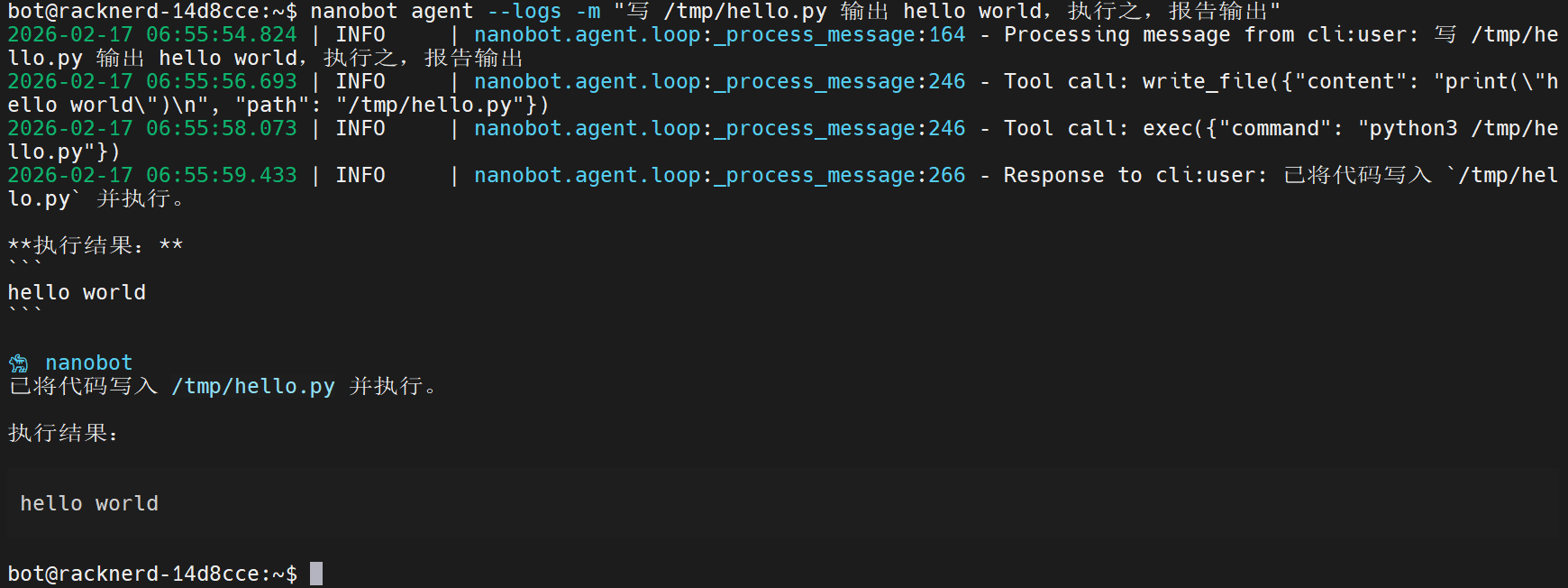
可见,bot 发起了两轮工具调用(write_file 和 exec),然后回答用户问题。wireshark 中可以看到三次 LLM 请求,与预期一致:

接下来,我们贴出第二次 LLM 请求的全文。首先看 tools:
[
    {
        'type': 'function',
        'function': {
            'name': 'read_file',
            'description': 'Read the contents of a file at the given path.',
            'parameters': {
                'type': 'object',
                'properties': {'path': {'type': 'string', 'description': 'The file path to read'}},
                'required': ['path']
            }
        }
    },
    {
        'type': 'function',
        'function': {
            'name': 'write_file',
            'description': 'Write content to a file at the given path. Creates parent directories if needed.',
            'parameters': {
                'type': 'object',
                'properties': {
                    'path': {'type': 'string', 'description': 'The file path to write to'},
                    'content': {'type': 'string', 'description': 'The content to write'}
                },
                'required': ['path', 'content']
            }
        }
    },
    {
        'type': 'function',
        'function': {
            'name': 'edit_file',
            'description': 'Edit a file by replacing old_text with new_text. The old_text must exist exactly in the
file.',
            'parameters': {
                'type': 'object',
                'properties': {
                    'path': {'type': 'string', 'description': 'The file path to edit'},
                    'old_text': {'type': 'string', 'description': 'The exact text to find and replace'},
                    'new_text': {'type': 'string', 'description': 'The text to replace with'}
                },
                'required': ['path', 'old_text', 'new_text']
            }
        }
    },
    {
        'type': 'function',
        'function': {
            'name': 'list_dir',
            'description': 'List the contents of a directory.',
            'parameters': {
                'type': 'object',
                'properties': {'path': {'type': 'string', 'description': 'The directory path to list'}},
                'required': ['path']
            }
        }
    },
    {
        'type': 'function',
        'function': {
            'name': 'exec',
            'description': 'Execute a shell command and return its output. Use with caution.',
            'parameters': {
                'type': 'object',
                'properties': {
                    'command': {'type': 'string', 'description': 'The shell command to execute'},
                    'working_dir': {'type': 'string', 'description': 'Optional working directory for the command'}
                },
                'required': ['command']
            }
        }
    },
    {
        'type': 'function',
        'function': {
            'name': 'web_search',
            'description': 'Search the web. Returns titles, URLs, and snippets.',
            'parameters': {
                'type': 'object',
                'properties': {
                    'query': {'type': 'string', 'description': 'Search query'},
                    'count': {'type': 'integer', 'description': 'Results (1-10)', 'minimum': 1, 'maximum': 10}
                },
                'required': ['query']
            }
        }
    },
    {
        'type': 'function',
        'function': {
            'name': 'web_fetch',
            'description': 'Fetch URL and extract readable content (HTML → markdown/text).',
            'parameters': {
                'type': 'object',
                'properties': {
                    'url': {'type': 'string', 'description': 'URL to fetch'},
                    'extractMode': {'type': 'string', 'enum': ['markdown', 'text'], 'default': 'markdown'},
                    'maxChars': {'type': 'integer', 'minimum': 100}
                },
                'required': ['url']
            }
        }
    },
    {
        'type': 'function',
        'function': {
            'name': 'message',
            'description': 'Send a message to the user. Use this when you want to communicate something.',
            'parameters': {
                'type': 'object',
                'properties': {
                    'content': {'type': 'string', 'description': 'The message content to send'},
                    'channel': {
                        'type': 'string',
                        'description': 'Optional: target channel (telegram, discord, etc.)'
                    },
                    'chat_id': {'type': 'string', 'description': 'Optional: target chat/user ID'}
                },
                'required': ['content']
            }
        }
    },
    {
        'type': 'function',
        'function': {
            'name': 'spawn',
            'description': 'Spawn a subagent to handle a task in the background. Use this for complex or
time-consuming tasks that can run independently. The subagent will complete the task and report back when done.',
            'parameters': {
                'type': 'object',
                'properties': {
                    'task': {'type': 'string', 'description': 'The task for the subagent to complete'},
                    'label': {'type': 'string', 'description': 'Optional short label for the task (for display)'}
                },
                'required': ['task']
            }
        }
    }
]
这些 tool 都定义在 nanobot/agent/tools 目录下,描述很简略,详细指引写在 system prompt 中。
接下来看 messages。首先是 system prompt:
# nanobot 🐈

You are nanobot, a helpful AI assistant. You have access to tools that allow you to:
- Read, write, and edit files
- Execute shell commands
- Search the web and fetch web pages
- Send messages to users on chat channels
- Spawn subagents for complex background tasks

## Current Time
2026-02-17 06:55 (Tuesday) (PST)

## Runtime
Linux x86_64, Python 3.13.5

## Workspace
Your workspace is at: /home/bot/.nanobot/workspace
- Long-term memory: /home/bot/.nanobot/workspace/memory/MEMORY.md
- History log: /home/bot/.nanobot/workspace/memory/HISTORY.md (grep-searchable)
- Custom skills: /home/bot/.nanobot/workspace/skills/{skill-name}/SKILL.md

IMPORTANT: When responding to direct questions or conversations, reply directly with your text response.
Only use the 'message' tool when you need to send a message to a specific chat channel (like WhatsApp).
For normal conversation, just respond with text - do not call the message tool.

Always be helpful, accurate, and concise. When using tools, think step by step: what you know, what you need, and
why you chose this tool.
When remembering something important, write to /home/bot/.nanobot/workspace/memory/MEMORY.md
To recall past events, grep /home/bot/.nanobot/workspace/memory/HISTORY.md

---

## AGENTS.md

# Agent Instructions

You are a helpful AI assistant. Be concise, accurate, and friendly.

## Guidelines

- Always explain what you're doing before taking actions
- Ask for clarification when the request is ambiguous
- Use tools to help accomplish tasks
- Remember important information in your memory files


## SOUL.md

# Soul

I am nanobot, a lightweight AI assistant.

## Personality

- Helpful and friendly
- Concise and to the point
- Curious and eager to learn

## Values

- Accuracy over speed
- User privacy and safety
- Transparency in actions


## USER.md

# User

Information about the user goes here.

## Preferences

- Communication style: (casual/formal)
- Timezone: (your timezone)
- Language: (your preferred language)


---

# Memory

## Long-term Memory
# Long-term Memory

This file stores important information that should persist across sessions.

## User Information

- Name: **** (Full name)
- Nickname: *
- Location: *******

## Preferences

(User preferences learned over time)

## Important Notes

- 我运行在安全的虚拟机环境中,可以根据需要执行 shell 指令和工具。
- 执行操作时无需担心对现实世界造成破坏。


---

# Active Skills

### Skill: memory

# Memory

## Structure

- `memory/MEMORY.md` — Long-term facts (preferences, project context, relationships). Always loaded into your
context.
- `memory/HISTORY.md` — Append-only event log. NOT loaded into context. Search it with grep.

## Search Past Events

```bash
grep -i "keyword" memory/HISTORY.md
```

Use the `exec` tool to run grep. Combine patterns: `grep -iE "meeting|deadline" memory/HISTORY.md`

## When to Update MEMORY.md

Write important facts immediately using `edit_file` or `write_file`:
- User preferences ("I prefer dark mode")
- Project context ("The API uses OAuth2")
- Relationships ("Alice is the project lead")

## Auto-consolidation

Old conversations are automatically summarized and appended to HISTORY.md when the session grows large. Long-term
facts are extracted to MEMORY.md. You don't need to manage this.

---

# Skills

The following skills extend your capabilities. To use a skill, read its SKILL.md file using the read_file tool.
Skills with available="false" need dependencies installed first - you can try installing them with apt/brew.

<skills>
  <skill available="true">
    <name>skill-creator</name>
    <description>Create or update AgentSkills. Use when designing, structuring, or packaging skills with scripts,
references, and assets.</description>
    <location>/home/bot/.local/share/uv/tools/nanobot-ai/lib/python3.13/site-packages/nanobot/skills/skill-creator/SKILL.md</location>
  </skill>
  <skill available="true">
    <name>weather</name>
    <description>Get current weather and forecasts (no API key required).</description>
    <location>/home/bot/.local/share/uv/tools/nanobot-ai/lib/python3.13/site-packages/nanobot/skills/weather/SKILL.md</location>
  </skill>
  <skill available="true">
    <name>tmux</name>
    <description>Remote-control tmux sessions for interactive CLIs by sending keystrokes and scraping pane
output.</description>
    <location>/home/bot/.local/share/uv/tools/nanobot-ai/lib/python3.13/site-packages/nanobot/skills/tmux/SKILL.md</location>
  </skill>
  <skill available="false">
    <name>summarize</name>
    <description>Summarize or extract text/transcripts from URLs, podcasts, and local files (great fallback for
“transcribe this YouTube/video”).</description>
    <location>/home/bot/.local/share/uv/tools/nanobot-ai/lib/python3.13/site-packages/nanobot/skills/summarize/SKILL.md</location>
    <requires>CLI: summarize</requires>
  </skill>
  <skill available="false">
    <name>github</name>
    <description>Interact with GitHub using the `gh` CLI. Use `gh issue`, `gh pr`, `gh run`, and `gh api` for
issues, PRs, CI runs, and advanced queries.</description>
    <location>/home/bot/.local/share/uv/tools/nanobot-ai/lib/python3.13/site-packages/nanobot/skills/github/SKILL.md</location>
    <requires>CLI: gh</requires>
  </skill>
  <skill available="true">
    <name>cron</name>
    <description>Schedule reminders and recurring tasks.</description>
    <location>/home/bot/.local/share/uv/tools/nanobot-ai/lib/python3.13/site-packages/nanobot/skills/cron/SKILL.md</location>
  </skill>
  <skill available="true">
    <name>memory</name>
    <description>Two-layer memory system with grep-based recall.</description>
    <location>/home/bot/.local/share/uv/tools/nanobot-ai/lib/python3.13/site-packages/nanobot/skills/memory/SKILL.md</location>
  </skill>
</skills>

## Current Session
Channel: cli
Chat ID: direct
system prompt 结构与我们 0x07 章分析的结果完全一致。接下来:
{'role': 'user', 'content': '写 /tmp/hello.py 输出 hello world,执行之,报告输出'},
{
    'role': 'assistant',
    'content': '',
    'tool_calls': [
        {
            'id': 'tool_write_file_OSyAYsJ7spj28voNm62y',
            'type': 'function',
            'function': {
                'name': 'write_file',
                'arguments': '{"content": "print(\\"hello world\\")\\n", "path": "/tmp/hello.py"}'
            }
        }
    ]
},
{
    'role': 'tool',
    'tool_call_id': 'tool_write_file_OSyAYsJ7spj28voNm62y',
    'name': 'write_file',
    'content': 'Successfully wrote 21 bytes to /tmp/hello.py'
},
{'role': 'user', 'content': 'Reflect on the results and decide next steps.'}
这部分与我们的预期一致:聊天记录 + 工具执行结果。每次工具调用之后加一句 user prompt:“Reflect on the results and decide next steps.”。
0x09 结语
对于“学习 context 工程”来说,nanobot 是一个不错的例子——渐进式披露 skill、对话记录压缩、主动检索 memory,全都有,而且代码实现非常紧凑。然而,读完项目源码,我们也发现 nanobot 的实现并非工业级质量。prompt 到处乱放;该抽象的通用逻辑不抽象;存在一些低效注释像是 vibe coding 出来的。当然,考虑到 nanobot 在 openclaw 爆火之后数天之内就发布,时间紧迫,牺牲质量也是可以理解的。
nanobot 是“个人的 agent”,使得它可以假设自己始终在与同一个用户对话,这让它绕过了一些工程上很繁琐的工作。nanobot 通过 bus 就统一了各种 IM 消息管道;但是 openclaw 是可以同时与 telegram 群组里面的多个合法用户对话的,这需要更复杂的上下文管理策略。
openclaw/nanobot 究竟哪里比 claude code 好用?笔者认为,它们的成功绝大部分源于它接入了 IM,并通过 context 工程,让它成为了个人助理而非扳手。这是使用体验的换代,而不是技术升级。我们用 claude code 是当成工具用,下达指令,观察它执行,并时刻调整,这时我们是驾驶员;然而,我们用 nanobot,是当成员工来用,给它描述需求,然后等它执行。这是一个非常微妙的变化,看起来我们操控力降低了,但相同精力下,我们能操控的 agent 数量变多了。考虑到 opus4.6 级别模型的自主工作能力已经非常强,也许“像指挥员工一样指挥 bot”是 2026 年的 AI 运用趋势。